_edited.png)

Wix Symphony AI Agent Readiness Map Your Workflow Before You Deploy
An AI agent can create new work as easily as it completes work. If the task is vague, the data is messy, or no one owns the final approval, the agent may only make your operations faster at producing confusion.
That is why the first question is not “What can Wix Symphony do?” The better question is “Which business workflow is ready for an agent?”
Wix has recently been positioning Symphony around AI-powered help for business and site operations. For small teams, that is worth watching. But product capabilities will keep changing. Features may vary by account, plan, region, connected Wix apps, and rollout status. A readiness map gives you a stable way to evaluate Wix Symphony AI agents before you test them, even as the product matures.
The goal is simple: choose one bounded task, define the context the agent needs, decide where a human must approve the work, and create a fallback path when the agent cannot complete the job safely.
Start with the workflow, not the tool
AI agents sound useful because they promise to act, not just answer. That also makes them operationally different from a chatbot or content assistant.
A chatbot may suggest a reply. An agent may draft the reply, update a record, trigger a workflow, or prepare the next step. That shift matters because small errors can touch customers, bookings, orders, service requests, or internal handoffs.
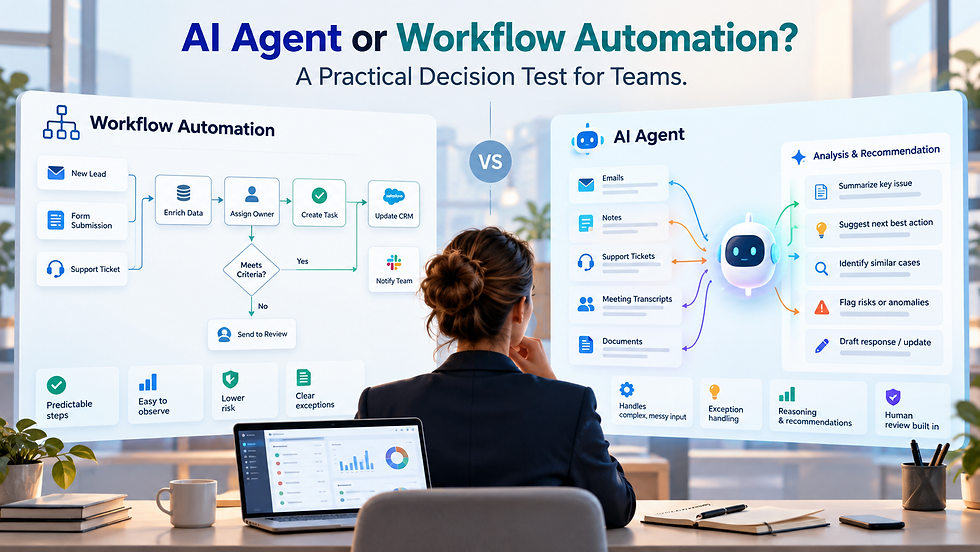
Not every process needs that level of flexibility. If the steps are predictable and follow clear rules, traditional automation may be enough. Our guide to AI Agent or Workflow Automation? A Practical Decision Test for Teams explains how to evaluate that choice before adding unnecessary complexity.
Before trialing Wix AI agents for small business, map the business task as it works today.
Ask four questions:
What starts the workflow?
Is it a form submission, online booking, store order, missed chat, invoice question, support request, or abandoned quote?
What decisions happen inside the workflow?
Does someone qualify the lead, check inventory, confirm service area, review payment status, or decide whether to escalate?
What systems or records does the team rely on?
This may include Wix CRM contacts, Wix Stores orders, Wix Bookings details, form fields, email threads, notes, tags, automations, or external tools.
What outcome counts as done?
A sent reply is not always “done.” The real outcome may be a booked appointment, updated customer record, assigned task, approved quote, or resolved request.
If no one can describe the current process in plain language, an AI agent will expose the gap. That is useful, but it is not a deployment plan.
Use an AI agent workflow mapping scorecard
A good first agent task should be narrow enough to test, valuable enough to matter, and low-risk enough to learn from.
Use this scorecard before you configure anything.
Readiness factor | Good candidate | Poor candidate |
Task scope | One clear job with a defined start and finish | Broad responsibility such as “manage customer service” |
Needed context | Data already exists in Wix or connected records | Context lives in memory, scattered chats, or private spreadsheets |
Decision complexity | Rules are clear and repeatable | Requires judgment, negotiation, or sensitive exceptions |
Customer impact | Low to moderate risk if reviewed before sending | High risk if wrong, urgent, legal, medical, or financial |
Approval point | A person can review the output quickly | No one owns final review |
Fallback path | Clear route to a human or manual process | Agent failure leaves the customer waiting |
The best starting workflows often sit in the middle of the business. They are repetitive, but not invisible. They matter, but one reviewed error will not damage the company.
Good candidates may include:
Categorizing new inquiries by service type
Drafting responses to common form submissions
Preparing booking follow-up notes
Summarizing customer history before a call
Flagging incomplete order or request details
Creating internal task suggestions for review
Poor first candidates include:
Sending final price quotes without review
Handling refund disputes alone
Making policy exceptions
Responding to angry customers without escalation
Editing live site content with no approval
Taking any action that creates legal, financial, or safety risk
Define the four controls before testing
AI agent workflow mapping should produce a simple operating agreement. It does not need to be a long document. It does need to answer four control questions.
Choose a bounded task
A bounded task has a clear input, a clear output, and a clear stop point.
Instead of:
“Use an AI agent to handle leads.”
Use:
“When a new contact form asks about residential service, draft a first response, identify missing details, and assign a follow-up task for staff review.”
That task is specific. It does not ask the agent to close the sale, judge the customer, or send anything without approval.
List the required context
The agent can only work well if it can access or receive the right information.
Create a short context checklist:
Customer name and contact details
Source of the request
Service or product requested
Location or service area details
Relevant order, booking, or form information
Prior customer notes, if available
Approved response guidelines
Internal rules for escalation
If the context is not available in Wix or a connected tool, fix that first. AI does not remove the need for clean fields, consistent tags, and accurate records.
Set the approval point
Decide where a human must review the work.
Common approval points include:
Before sending a customer-facing message
Before changing an order, booking, or contact record
Before applying a discount or refund
Before publishing site content
Before closing a support issue
For early trials, keep approval close to the output. Let the agent prepare work, not finalize it. Once the team trusts the workflow, you can decide whether any step deserves more automation.
Create the human fallback
Every agent workflow needs an exit ramp.
Define what happens when the agent cannot complete the task, lacks context, detects a sensitive issue, or produces low-confidence work. The fallback should be simple:
Assign the request to a named role or queue
Add a clear status or tag
Preserve the customer’s original message
Include a short reason for escalation
Set an expected response step
Fallback is not failure. It is how the system protects the business.
Assess Wix Symphony after the map is clear
Once the workflow is mapped, look at Wix Symphony through that lens.
At the time of drafting, Wix Symphony is a current product direction tied to AI assistance and agent-style capabilities across Wix. Because feature availability can change, do not build your readiness plan around a single announced feature. Build it around the job the business needs done.
For businesses that need more flexibility, Wix also offers development tools like Velo for building custom functionality and connecting business processes. Our guide to 3 Business Models You Didn’t Know You Could Create with Velo by Wix explores how those capabilities can support different business needs. Understanding these options can help teams identify which workflow gaps require custom development rather than AI automation.
When reviewing Wix Symphony in your own Wix environment, check for these practical details:
Which parts of Wix can the agent access?
Can it read the records needed for the task?
Can it write, edit, tag, assign, or trigger actions?
Can actions require human approval?
Can you limit permissions by role or workflow?
Can you see what the agent did and why?
Can you test in a low-risk workflow before using it live?
Can you turn the workflow off quickly if needed?
This is where Wix business automation and AI agent planning meet. Traditional automation follows fixed rules. An agent may interpret context and choose a next step. That can be useful, but it increases the need for boundaries.
If the product can support your bounded task with the right permissions, review steps, and audit visibility, it may be ready for a pilot. If not, the map still helps. It shows which data, process, or tool gaps to fix before the next trial.
A hypothetical readiness example
Scenario
A home services company uses Wix for its website, contact forms, and bookings. The owner wants an AI agent to help with new service inquiries.
Before introducing an agent, the business could use interactive forms or quizzes through Outgrow to collect details such as service type, location, and customer needs. This helps structure incoming inquiries so the team has clearer information to work with before considering automation.
Weak version
“Have the agent respond to every lead and book appointments.”
This is too broad. The agent may lack service area rules, pricing limits, technician availability, or context about unusual jobs.
Mapped version
“When a new form submission asks for a standard maintenance visit, the agent drafts a reply, checks whether required fields are present, suggests the correct service category, and creates a staff review task. A human approves the message before it is sent.”
Required context
Submitted service type
ZIP code or service area
Preferred dates
Customer contact details
Existing customer status
Approved response language
Booking rules
Approval point
A staff member reviews the drafted response and suggested next step before the customer receives it.
Fallback
If the request mentions emergency service, unclear scope, pricing dispute, or missing location, the agent assigns it to a human and marks it for manual review.
This is a better pilot because it reduces busywork without handing over final judgment.
Your pre-deployment checklist
Before you deploy any AI agent, confirm the basics.
The workflow has one clear owner
The task has a defined start and stop point
The agent has the context it needs
Data fields are clean enough to support the task
Customer-facing outputs require review at first
Sensitive cases route to a person
Staff know how to override the agent
The team can see what happened after each run
The pilot has a narrow test period
Success means better handling of the task, not full automation
The strongest pilots often feel modest. That is the point. A small, controlled agent workflow teaches the team how the tool behaves, where the data breaks down, and which controls matter most.
Final Thoughts
Wix Symphony may become a useful layer for small-business operations, especially for teams already running key workflows through Wix. But readiness does not start with the product menu. It starts with the workflow.
Pick one bounded task. Name the context. Set the approval point. Build the human fallback. Then assess whether the current Wix Symphony capabilities can support that process safely.
Before trialing an AI agent, draw the workflow on one page and review it with the people who handle the work today. If they can explain where the agent helps, where a person approves, and what happens when the agent gets stuck, you are ready for a much smarter test.


Comments